
Does Snapchat Notify When You Screenshot a Story?
By the View Snapchat Stories team · · 2 min read

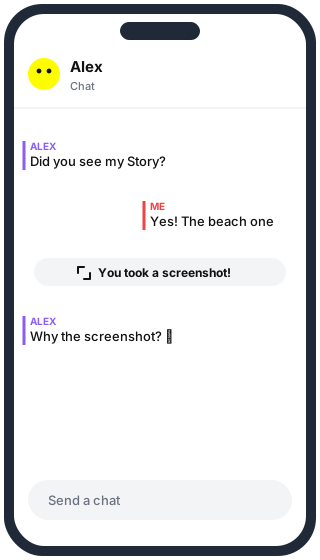
When Snapchat sends a notification
| You screenshot or record… | Do they get told? | What they see |
|---|---|---|
| A Snap sent to you | Yes | “You took a screenshot” note in the chat |
| A chat message | Yes | Note in the chat |
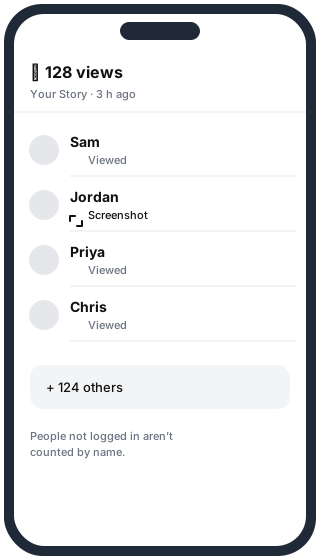
| A friend’s Story | Yes | Screenshot icon next to your name in the viewer list |
| A public Story, while logged in | Yes, if they can see your name in the viewer list | Screenshot icon by your name |
| A public Story, not logged in (web or a viewer site) | No | Nothing: there is no account to show |
| Spotlight video | No | Spotlight shows views, not who saved it |
Screen recording is treated like a screenshot: on both iPhone and Android, Snapchat detects it and shows the same kind of notice. Details in Does Snapchat notify when you screen record?
Tricks that don’t work any more
- Airplane mode: Snapchat stores the screenshot event and sends it when you reconnect.
- Clearing the cache after a screenshot: the event is usually reported before you get the chance.
- Third-party “Snapchat saver” apps: they need your login, break Snapchat’s rules and can get your account locked.
Filming the screen with a second phone isn’t detected, but the person still trusted you with that Snap. If they didn’t want it kept, don’t keep it.
Saving a public Story without a notification
Public Stories are published on the web. If you open one without logging in, there is nothing to notify:
- Copy the account’s username.
- Paste it into our Snapchat Story Downloader.
- Open the snap and press Save. It downloads as MP4 or JPG.
This only works for public Stories. Friends-only Stories and private Snaps are never on the web.
Questions
Does Snapchat notify when you screenshot a profile? No. Profiles, Bitmojis and Snap Map views don’t trigger notifications.
Can I turn screenshot notifications off? No. They can’t be switched off on either side.
Does saving a chat notify them? Yes, saved messages are shown in grey to both people.