Does Snapchat Notify When You Save a Chat?
By the View Snapchat Stories team · · 2 min read

What each action shows the other person
| You… | Notification? | What they can see |
|---|---|---|
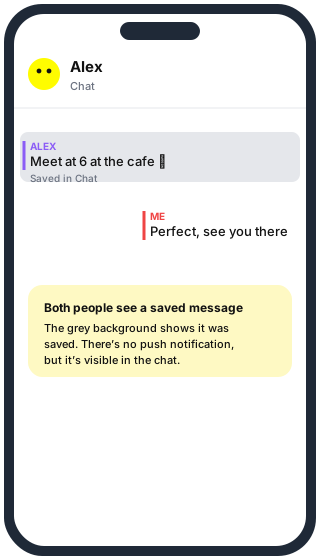
| Save a chat message (press and hold → Save in Chat) | No | The message turns grey for both of you |
| Unsave a message | No | The grey goes away; the message can disappear on the normal schedule |
| Save a Snap in the chat | No | The Snap is marked as saved in the chat |
| Screenshot the chat | Yes | “You took a screenshot!” line in the chat |
| Copy a message’s text | No | Nothing |
How to save or unsave a message
- Open the chat.
- Press and hold the message.
- Tap Save in Chat. To undo it, press and hold again and tap Unsave in Chat.
Either person can unsave their own saved copy. If you both saved a message, it stays until you have both unsaved it.
Why messages disappear in the first place
Snapchat deletes chats on a timer you choose per conversation: press and hold the friend’s name in your chat list, tap Chat Settings → Delete Chats, and pick after viewing or 24 hours after viewing. Saving a message is how you keep one past that timer.
Saving vs screenshotting
Saving is the polite way to keep a message: it’s visible, and it can be undone. A screenshot creates a copy outside Snapchat that the other person can’t remove, which is why Snapchat announces it. See Does Snapchat notify when you screenshot? for every case.
Questions
Can I save a chat without them knowing? Not inside Snapchat. Every saved message is visible to both people.
Does deleting a sent message notify them? They see a line saying a chat was deleted, but not what it said.
Do saved chats ever expire? No. They stay until someone unsaves them or one of you deletes the conversation.